 FaxStore
Payment Protection
Payment Protection keeps track of refunds and disputes (chargebacks) from Stripe, PayPal and Square, and protects what customers bought with those payments:
Cases: every refund and dispute shows up under Sales → Payment Protection, linked to the customer and the FaxStore payment.
Access: FaxStore can remove the products, subscriptions and orders a refunded or disputed payment bought, and give them back if you win the dispute.
Evidence: FaxStore builds your dispute evidence from the order, the customer's account and every download they made, including a PDF report. For Stripe, it's saved on the dispute for you to check and submit.
Alerts: owners hear about new refunds, disputes and outcomes in the staff panel, and in Discord if you like.
Table of Contents
How It Works
When a payment is refunded or disputed, your payment gateway sends FaxStore a message called a webhook. FaxStore checks the message is really from your gateway, finds the payment it's about, and opens a case:
Refunds get one case per payment. If you refund part of a payment, then more later, the same case adds them up and shows Partly refunded until the whole payment, including tax, is refunded.
Disputes get one case each. The case follows the dispute through to Won, Lost or Closed.
What happens next depends on your settings. By default, FaxStore removes what the payment bought when it's fully refunded or when a dispute opens, and gives it back if you win the dispute.
Sometimes a gateway reports a dispute before FaxStore has saved the payment, for example when a card is disputed the moment it's charged, before the customer is back from checkout. The case waits, and FaxStore matches it to the payment as soon as the payment is saved, then applies your settings and builds the evidence. The timeline shows Matched to payment when this happens.
Payments made before you updated FaxStore are matched too, as long as they were paid through Stripe, PayPal or Square checkout.
Connecting Your Payment Gateways
Owners connect gateways with Webhooks in the top right of Staff Panel → Sales → Payment Protection. The dot on the button turns orange while a gateway you use isn't connected. Each gateway shows the URL to give it, the events to send, and where to set it up. Copy the URL with the button next to it.
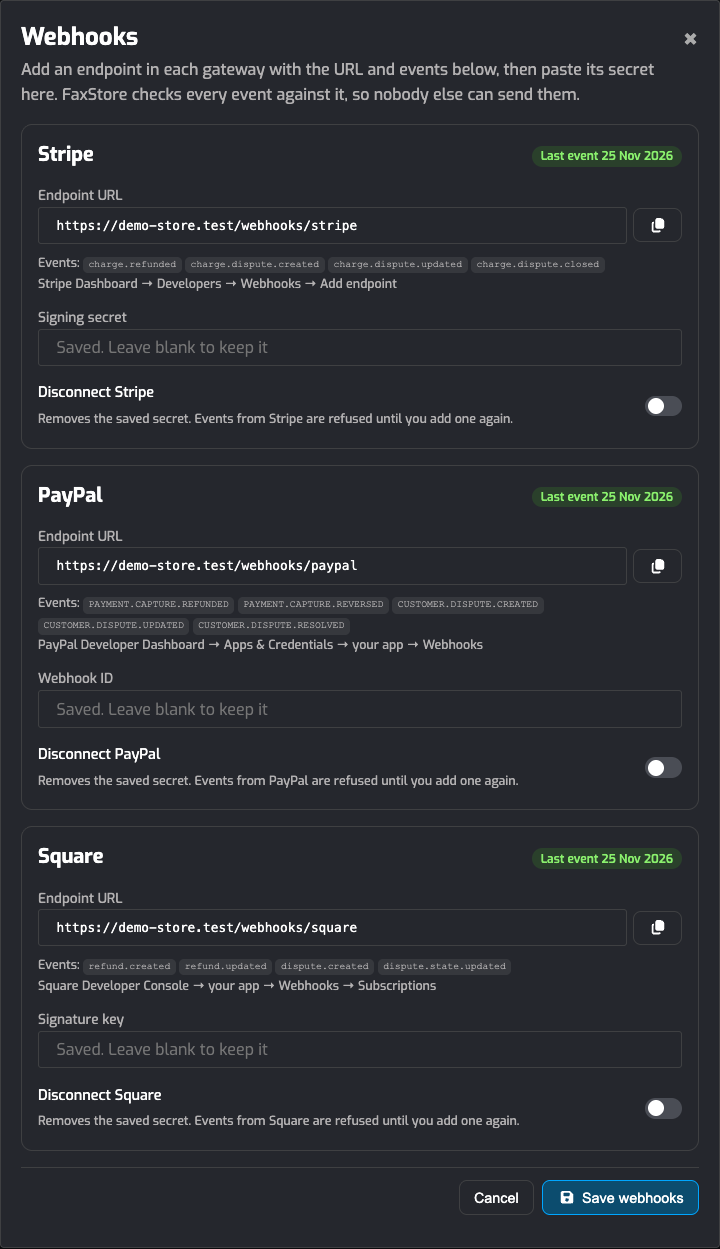
Webhook secrets are kept in config.json with your other payment keys, and never shown again once saved. Leave a field blank to keep what's saved, or turn on Disconnect to remove it.
Stripe
In the Stripe Dashboard, go to Developers → Webhooks and select Add endpoint.
Paste your FaxStore Stripe URL, for example
https://store.example.com/webhooks/stripe.Select these events:
charge.refunded,charge.dispute.created,charge.dispute.updatedandcharge.dispute.closed.Save the endpoint, then reveal its Signing secret (it starts with
whsec_).Paste the signing secret into Stripe → Signing secret in FaxStore and select Save webhooks.
To test on your own computer, the Stripe CLI can forward events: stripe listen --forward-to localhost:3000/webhooks/stripe prints a signing secret to paste into FaxStore. Paying with the test card 4000 0000 0000 0259 opens a dispute straight away.
PayPal
In the PayPal Developer Dashboard, go to Apps & Credentials and open the app your store uses (the one whose client ID is in your payment settings).
Under Webhooks, select Add Webhook and paste your FaxStore PayPal URL.
Select these events:
Payment capture refunded,Payment capture reversed,Customer dispute created,Customer dispute updatedandCustomer dispute resolved.Save, then copy the webhook's Webhook ID.
Paste it into PayPal → Webhook ID in FaxStore and select Save webhooks.
PayPal checks each event for FaxStore, so PayPal must be turned on in your payment settings.
Square
In the Square Developer Console, open your application and go to Webhooks → Subscriptions, then select Add subscription.
Paste your FaxStore Square URL. It must match exactly, including
https://.Select these events:
refund.created,refund.updated,dispute.createdanddispute.state.updated.Save, then copy the subscription's Signature key.
Paste it into Square → Signature key in FaxStore and select Save webhooks.
Once a gateway sends its first event, it shows Last event with the date. Stripe and Square have a Send test event option you can use to check the connection. A test event that isn't a refund or dispute is accepted without opening a case.
Opening Payment Protection
Go to Staff Panel → Sales → Payment Protection. You need the Manage Owned Items permission. If a gateway you use isn't connected yet, a notice at the top says so.
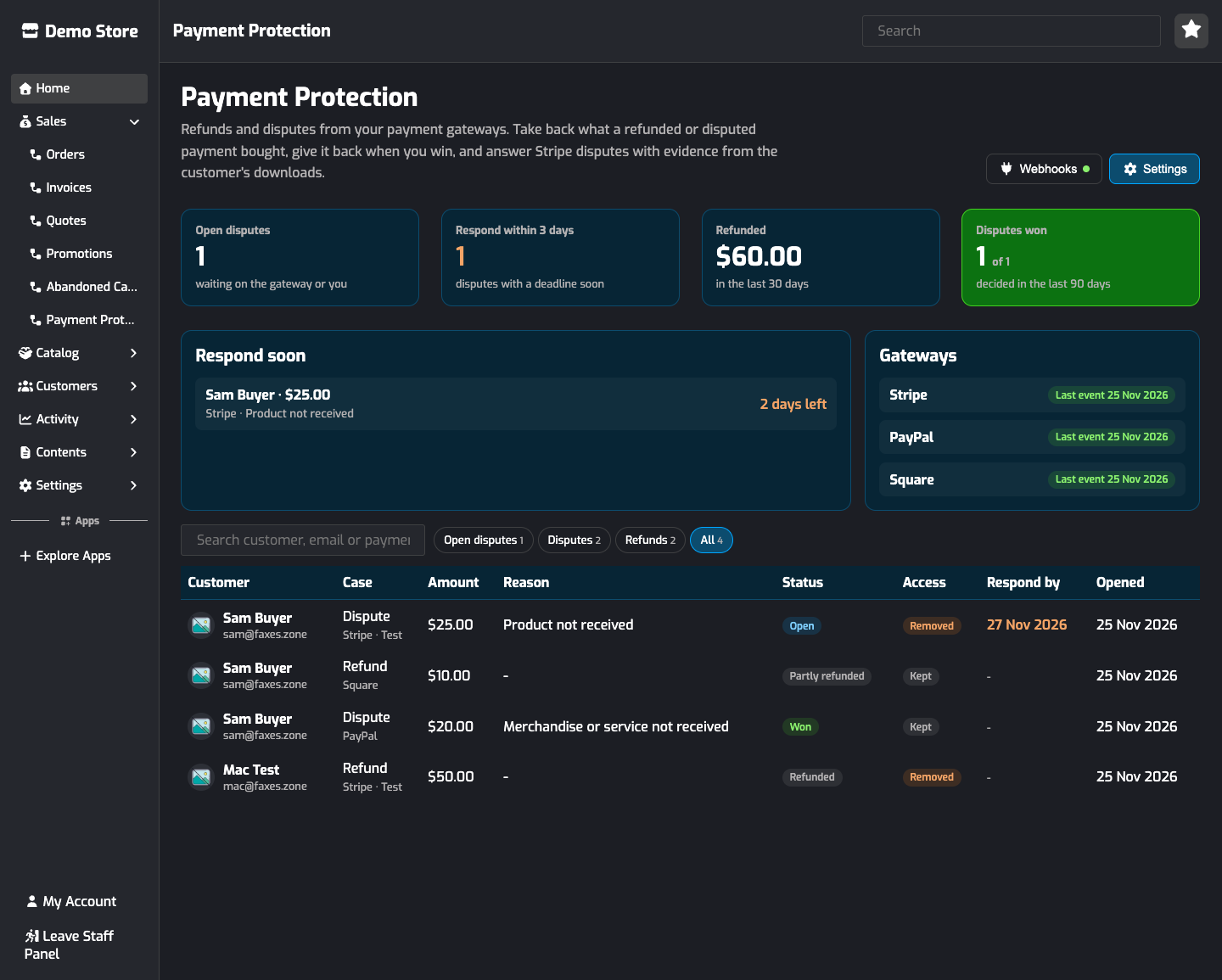
Tile | What it shows |
|---|---|
Open disputes | Disputes that haven't been decided yet. |
Respond within 3 days | Open disputes with a response deadline in the next three days. |
Refunded | How much was refunded in the last 30 days. |
Disputes won | Disputes won out of all disputes decided in the last 90 days. The tile turns green when you've won at least as many as you've lost. |
Below the tiles:
Respond soon lists open disputes, soonest deadline first, with the days left. Select one to open it.
Gateways shows whether Stripe, PayPal and Square are connected and when each last sent an event.
The Cases Table
Search by customer name, email, customer ID, payment number (like #171) or the gateway's transaction ID. The filters next to the search show Open disputes (the default), all Disputes, all Refunds, or All cases.
Column | What it shows |
|---|---|
Customer | The customer and their email. Unmatched payment means FaxStore hasn't found the payment yet, see How It Works. |
Case | Refund or dispute, the gateway, and Test for Stripe test mode. |
Amount | How much was refunded or disputed. |
Reason | The reason the customer gave their bank or gateway. |
Status | Open, Won, Lost or Closed for disputes, Refunded or Partly refunded for refunds. |
Access | Removed if FaxStore has taken back what the payment bought, otherwise Kept. |
Respond by | The gateway's deadline for open disputes. Dates within three days are highlighted. |
Opened | When FaxStore received the refund or dispute. |
Select a row to open the case.
Developer Events
See FaxStore Events for a list of events for payment protection.
A Case
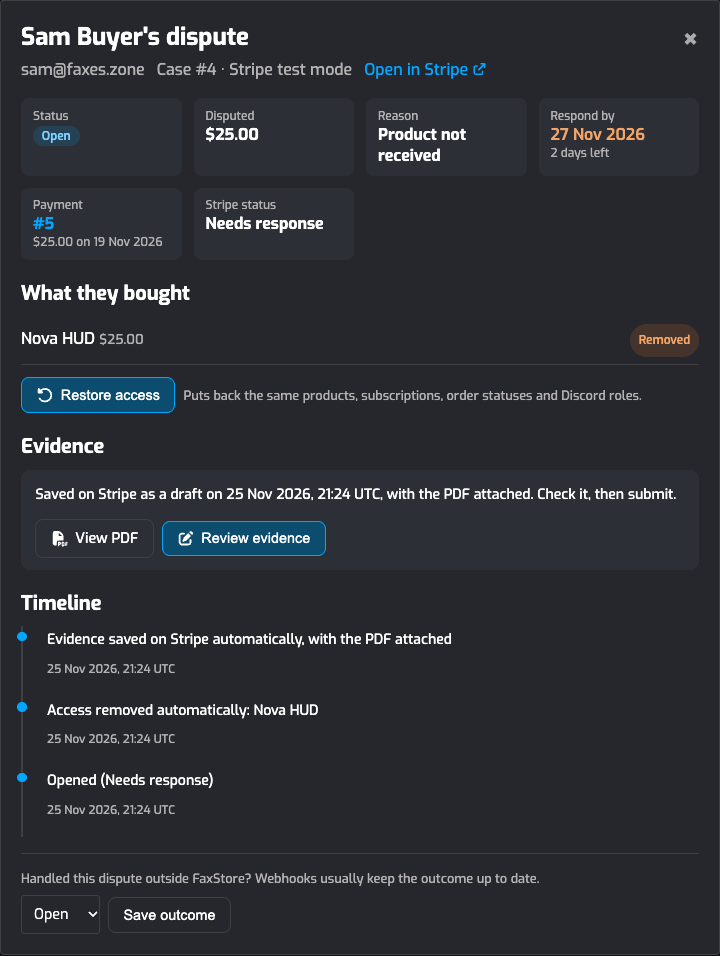
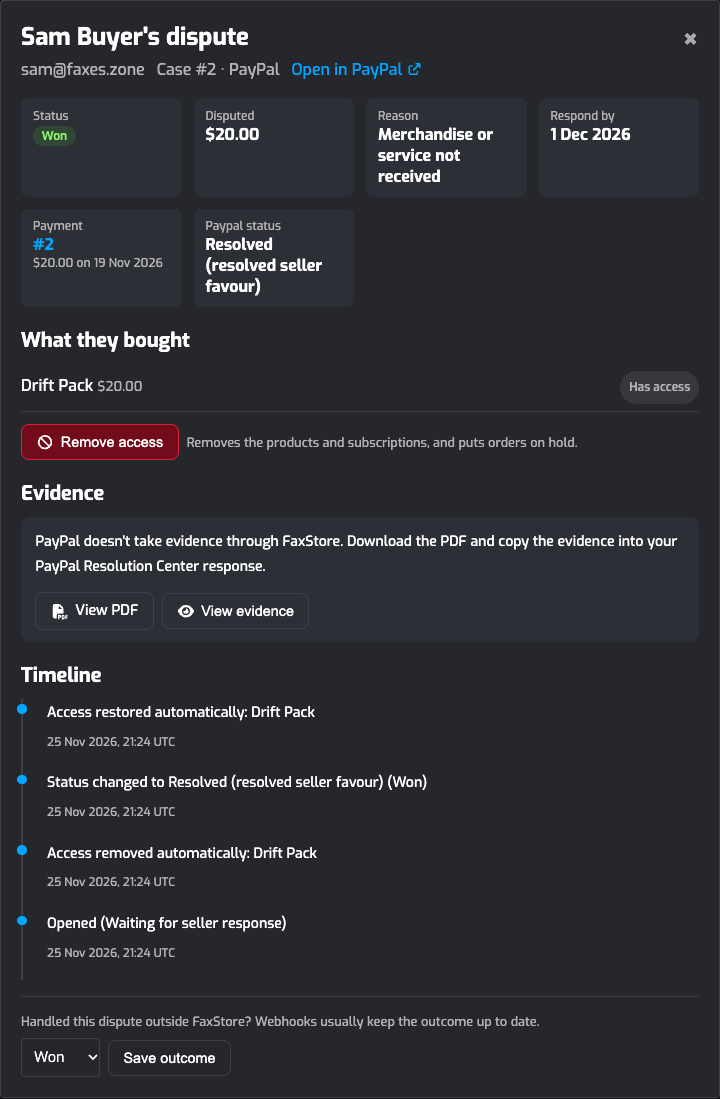
The case opens in a window. The top shows the customer's email, the case number and gateway, and Open in Stripe (or PayPal or Square) to go to your gateway's dashboard. The boxes below show the status, the amount, the reason, the deadline and days left for disputes, the FaxStore payment (select it to open the receipt) and the gateway's own status.
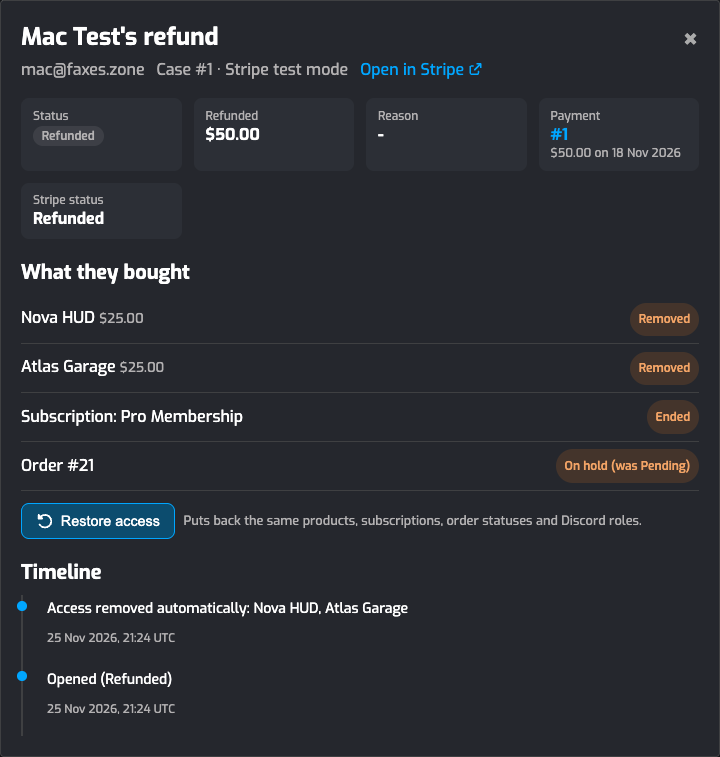
What they bought lists the products from the payment, marked Removed or Has access, plus any subscriptions ended and orders put on hold, with a Restore access or Remove access button. See Removing and Restoring Access.
Evidence (disputes only) shows where the evidence is up to, with View PDF and Review evidence. See Dispute Evidence.
Timeline lists everything that happened, newest first: status changes from the gateway, matching to the payment, access being removed or restored and by whom, evidence being saved or submitted, and outcome changes.
Save outcome (disputes only) at the bottom changes the outcome yourself, for a dispute you handled outside FaxStore, for example by phone with your bank. Webhooks usually keep it up to date.
Removing and Restoring Access
When FaxStore removes access for a payment, it takes back everything that payment gave the customer:
Products bought with the payment are removed from the customer's account, so they can't download them.
Subscriptions started by the payment are ended.
Renewal invoices: if the payment paid a subscription renewal invoice, that subscription is ended. This works for invoices paid after you updated FaxStore.
Physical orders aren't deleted. Their status changes to On hold (refunded) or On hold (disputed) so you know not to ship them.
Discord roles for the removed products are taken away, unless the customer still owns the product from another purchase.
The customer gets a notification. For a refund it says the products were removed. For a dispute it says access is paused while the dispute is open.
Restore access puts back exactly what was removed: the same owned products with their license details, the same subscriptions, the order statuses they had, and their Discord roles. The customer is told their access is back.
FaxStore doesn't remove gift cards bought with the payment, or Tebex packages, which are delivered by Tebex. Check those yourself.
If the dispute and a full refund are for the same payment, winning the dispute doesn't give access back, because the customer already has their money.
Dispute Evidence
FaxStore builds evidence for every dispute matched to a payment. For Stripe disputes, it's saved on Stripe as a draft as soon as the dispute opens, with the evidence PDF attached. Select Review evidence on the case to check it.
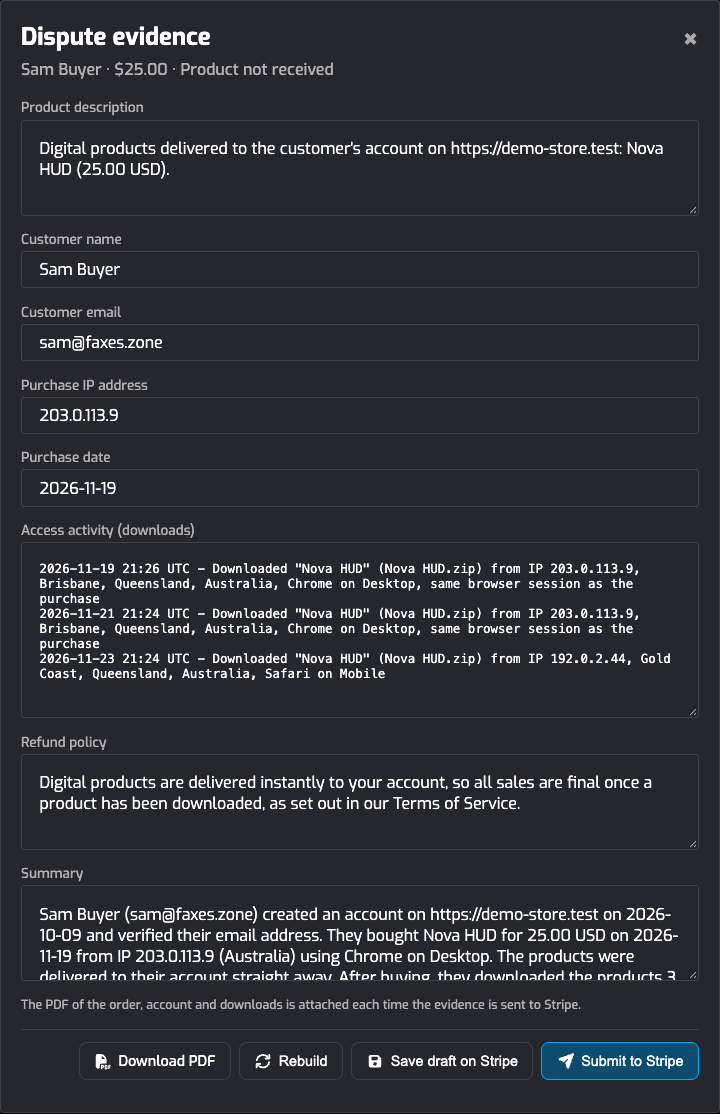
Field | Where it comes from |
|---|---|
Product description | The products in the payment and their prices. |
Customer name and Customer email | The customer's account. |
Purchase IP address | The IP address the customer paid from. |
Purchase date | When the payment was made. |
Access activity (downloads) | Every download of the products since the purchase, with the date, file, IP address, location, browser and device, and whether it was made in the same signed-in browser session the customer paid from. |
Refund policy | The refund policy you enter in Settings. |
Summary | A short account in plain language: when the customer signed up, what they bought and from where, how many times they downloaded it from which IP addresses, and whether they downloaded from the same IP address or browser session they paid from. |
Edit any field, then:
Save draft on Stripe sends your changes to Stripe without submitting them.
Submit to Stripe submits the evidence. Stripe only accepts one submission per dispute, so FaxStore asks you to confirm first.
Rebuild builds the fields again from the latest downloads, replacing your edits. It doesn't send anything to Stripe until you save.
Download PDF saves the evidence PDF.
Each time the evidence is sent to Stripe, a fresh PDF is attached. You can also add your own files, like screenshots, in the Stripe Dashboard before submitting.
Once evidence is submitted, or the dispute is closed, the evidence can no longer be changed and Review evidence becomes View evidence. You can change how evidence is handled in Settings, including submitting it automatically.
PayPal and Square don't accept evidence through FaxStore. FaxStore still builds the evidence and the PDF for their disputes. Use Copy all to paste the text into your response in the PayPal Resolution Center or the Square Dashboard, and upload the PDF there.
The Evidence PDF
View PDF on a dispute opens a "Proof of purchase and access" report built from your store's records. It's what FaxStore attaches to Stripe disputes, and you can upload it to PayPal or Square yourself.
It lists:
The dispute: gateway, dispute ID, transaction ID, reason, amount and date.
The order: order number, date, amount charged, payment method, the IP address, location and device the customer paid from, that it was delivered to their account straight away, and the products bought.
The customer's account: name, email, customer ID, when the account was made, how they sign in and whether their email is verified.
Downloads after purchase: a summary, then every download with its date, product, file, IP address, location and network, device, and whether it was made in the same signed-in browser session as the purchase.
FaxStore has recorded every download in this detail for a while now, so disputes about older purchases get the full history too.
Settings
Owners change these with Settings in the top right.
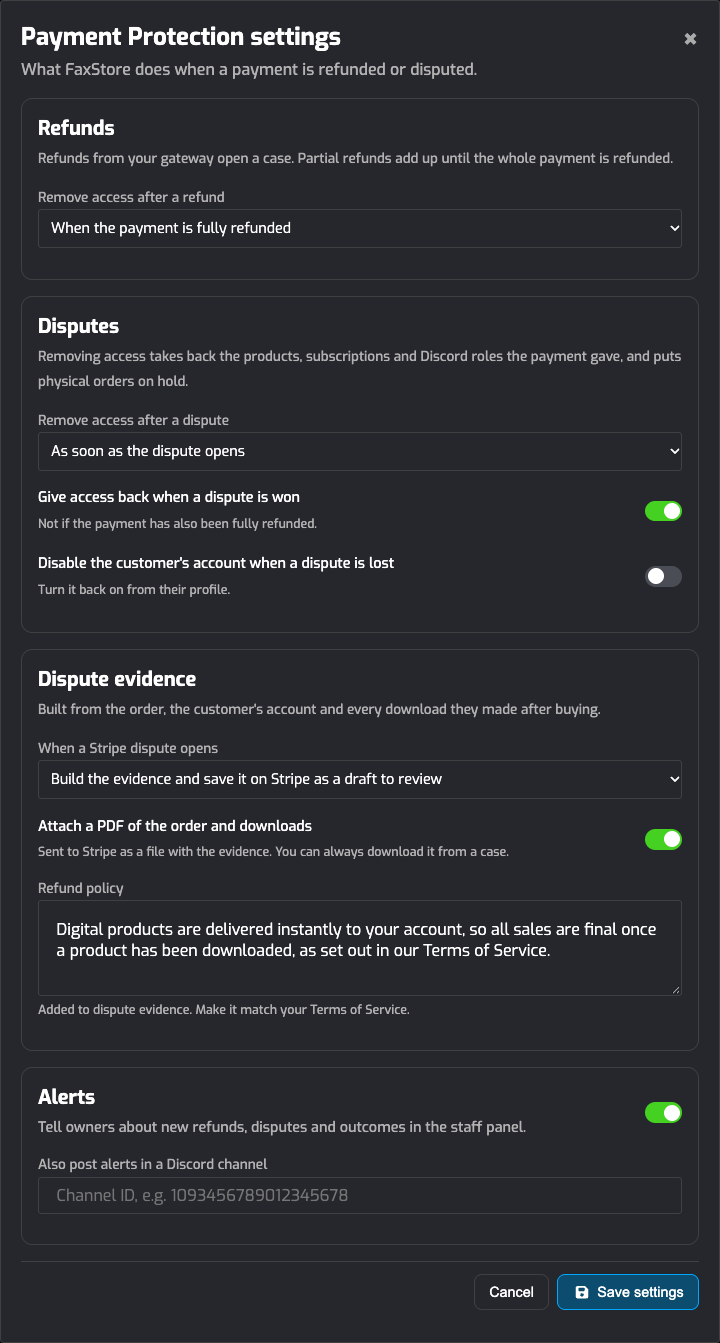
Setting | What it does |
|---|---|
Remove access after a refund | When the payment is fully refunded (the default), When any amount is refunded, or Never. |
Remove access after a dispute | As soon as the dispute opens (the default), Only if the dispute is lost, or Never. |
Give access back when a dispute is won | On by default. |
Disable the customer's account when a dispute is lost | Off by default. A disabled customer can't use their account until you turn it back on from their profile. |
When a Stripe dispute opens | Build the evidence and save it on Stripe as a draft to review (the default), Build the evidence and submit it straight away, or Don't build it automatically. You can always build it from the case. |
Attach a PDF of the order and downloads | On by default. Attaches the evidence PDF whenever evidence is sent to Stripe. |
Refund policy | Added to dispute evidence. Make it match your Terms of Service. |
Alerts | See Alerts. |
Alerts
With Alerts on, owners get a staff panel notification when:
a payment is refunded or partly refunded,
a new dispute opens, with the reason and the deadline,
a dispute is won, lost or closed.
Each notification opens the case. To post the same alerts in Discord, enter a channel ID under Also post alerts in a Discord channel. Your Discord bot needs to be able to post in that channel.
On a Customer's Profile
On a customer's profile under Customers, the Payments table shows Refunded, Partly refunded, Disputed, Dispute won or Dispute lost next to payments with a case. Select it to open the case.
Permissions
To... | You need |
|---|---|
See cases, remove or restore access, change a dispute's outcome, download the evidence PDF, and save or submit evidence | Manage Owned Items |
Change the settings and webhook secrets | Owner |
Removing or restoring access, changing an outcome, submitting evidence and changing settings are all recorded in the audit log.
Troubleshooting
The gateway says the webhook failed with "Invalid signature". The secret in FaxStore doesn't match the endpoint. Copy the signing secret (Stripe), webhook ID (PayPal) or signature key (Square) again and save it. Each endpoint has its own secret, so test mode and live mode endpoints in Stripe have different ones.
Square events always fail. Square signs the URL as well as the event, so the URL in Square must exactly match your store's domain in FaxStore followed by /webhooks/square, including https:// and without a trailing slash.
PayPal events fail. FaxStore asks PayPal to check each event, so PayPal must be turned on in your payment settings with the same app's client ID and secret.
A case says "Unmatched payment". If the customer was still checking out, it's matched within a few seconds of the payment being saved, or the next time you open Payment Protection. If it stays unmatched, the refund or dispute is for a payment FaxStore didn't take, so there's nothing to remove or build evidence from, but the case is still tracked.
A refund didn't remove access. Check Remove access after a refund. With the default setting, only full refunds remove access. A partial refund shows as Partly refunded with access Kept.
The evidence PDF has no downloads. The customer hasn't downloaded the products since buying them, which is worth knowing for the dispute too.
Nothing shows up at all. Check Gateways. Not connected means no secret is saved. Waiting for first event means the gateway hasn't sent anything yet. Check the endpoint is enabled in your gateway and that its events include the ones listed.