 FaxStore
SendGrid Integration
FaxStore includes support for SendGrid to handle outgoing email delivery through the SendGrid API. This allows store emails to be sent through a dedicated email service instead of relying on local mail configuration.
SendGrid can be used for important customer and store communications, including purchase confirmation emails and custom email broadcasts.
SendGrid is the recommended email integration for FaxStore.
Table of Contents
What is SendGrid Used For?
When SendGrid is configured in FaxStore, it can be used for:
Purchase confirmation emails sent to customers after checkout
Custom emails sent to a specific user
Bulk emails sent to all users for announcements or updates
Using SendGrid helps provide more reliable email delivery and keeps store communications connected to a supported email API platform.
Setting Up SendGrid on FaxStore
Before enabling SendGrid in FaxStore, a SendGrid account and API key are required.
Some SendGrid accounts may also require sender or domain authentication before email sending is fully enabled. If that appears during setup, complete the verification steps shown in the SendGrid dashboard before continuing.
Creating a SendGrid API Key
Sign in to the SendGrid dashboard
Open the API Keys section
Create a new API key with the permissions required for sending email
Copy and store the key somewhere safe
The API key is only shown once after creation. If it is lost, a new key will need to be generated.
Configuring FaxStore
After the API key has been created, add it to the FaxStore configuration by editing the SendGrid integration within the staff panel of the store.
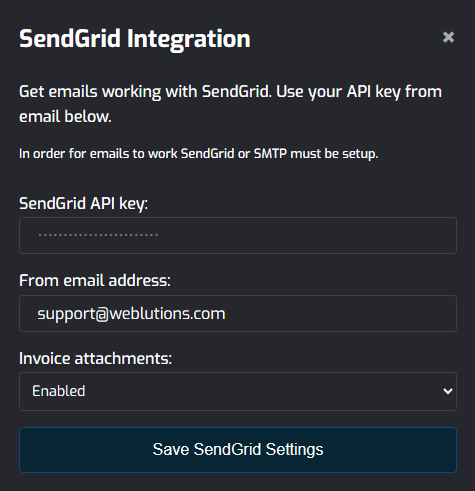
Options when configuring include:
SendGrid API key, is required for SendGrid to work on a custom domain/account. However, with no SendGrid setup it can still be used with Email Fallbacks
From address, is the email address SendGrid will use to send emails from. This domain must be a verified domain with SendGrid for emails to be delivered
Invoice attachments, allow for any invoice and receipt PDFs to be attached in emails sent to customers upon invoice generation and checkout
Common Notes & Troubleshooting
Keep the API key private and never expose it publicly
If emails are not sending, confirm the API key is valid and active
If SendGrid requires domain or sender verification, emails may fail until that process is completed
Ensure the configuration file has been saved and the store has been restarted after changes are made
SendGrid can be known to be strict with who creates accounts. Ensure if creating an account no VPN or Private Relay is active as SendGrid flags and bans these account