 FaxStore
Discord Integration
FaxStore includes a comprehensive set of Discord integrations designed to connect FaxStore with a Discord community. These features allow automation of roles, logging of store activity, community growth tools, and developer access for building custom integrations. The Discord integration helps centralize community interaction and store activity within a single platform.
Table of Contents
Discord Bot
FaxStore includes a fully integrated Discord bot that connects the store with a Discord server. The Discord bot handles communication between FaxStore and Discord and powers several platform features including:
Automatic role assignment
Audit logging reference
Commands
Community integrations
The bot is designed to operate automatically once configured and requires minimal manual maintenance.
Audit Logging
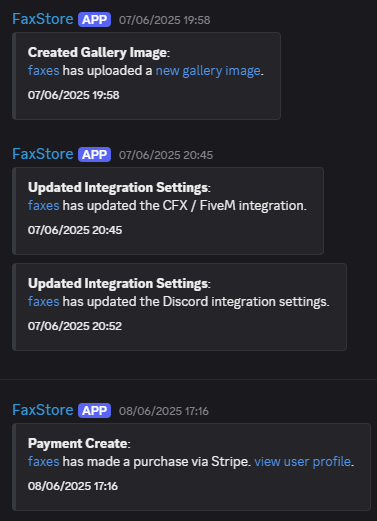
FaxStore can send store activity logs directly to a designated Discord channel. These logs provide visibility into important store events and actions.
Typical events included in audit logs:
Purchase events
Account updates
product changes
and just about everything
These logs allow administrators to monitor activity and maintain transparency within a Discord server allowing ease of access to what's happening on FaxStore.
Automatic User Join
This feature allows users to be automatically invited to a Discord server when certain actions occur. This functionality is typically used to grow a community alongside store activity.
Users may be invited when:
An account registration is made via Discord
A purchase is completed on a Discord linked account
Once configured, the process occurs automatically without requiring manual invitations. It can be turned off through the configuration file if desired.
Customer Roles
FaxStore supports automatic Discord role assignment based on purchase activity. There's two types of automatic role assignment:
Global Customer Roles, are assigned when a Discord connected account makes any purchase or order.
Product-Specific Roles, are assigned to products and are only given to an account when the product is purchased.
Multiple roles can be configured by separating role IDs with commas.
123456789,098765432,753159846If a user joins the Discord server after a purchase has already been completed, the FaxStore Discord bot will automatically check the accounts order history and apply any roles that should be assigned.
Built-in Commands
FaxStore includes built-in Discord slash commands designed to assist with support and user look-ups. Available commands include:
/userprovides a look up feature to obtain a link to a Discord account/searchprovides a search function for FaxStore to query accounts, products, and blog posts.
These commands can be enabled or disabled through the FaxStore configuration file.
Developer Integration
FaxStore exposes its Discord bot internally for developers who want to extend functionality or build integrations to further enhance the Discord bot.
The bot can be accessed through the faxstore.discord object which gains access to the below content
faxstore.discord = {
    bot: bot, // Discord.js Client instance
    client: bot,
    guild: null,
    EmbedBuilder: EmbedBuilder,
    MessageEmbed: EmbedBuilder,
    ApplicationCommandType: ApplicationCommandType,
    ApplicationCommandOptionType: ApplicationCommandOptionType
};
This object provides access to:
The Discord bot client instance
Builders used for creating embeds and commands
Discord application command types
The active Discord guild (once initialized)
This allows extensions and custom scripts to interact directly with the Discord bot.
Discord Role Management via Events
FaxStore and any created extensions can emit events which add or remove role(s) from the provided account.
faxstore.emit('addDiscordRole', user, roles)
faxstore.emit('removeDiscordRole', user, roles)
These events allow extensions or custom integrations to add or remove roles dynamically based on store activity.
Further details about available events can be found in the FaxStore Events Documentation.