 Knowledgebase
NGINX Upload Limits - 413 Entity Too Large
Have you been using your website and you get an Nginx 413 Entity Too Large error displayed just like the below image?

By default Nginx comes with a rather small upload limit for mainly security and disk usage reasons. However, this is something that is easy to change and have the limit increased. Depending how a website uploads data to the server it may mean larger limits are needed. Follow the below steps for a quick fix on this issue.
Updating the Limit
To change the limit of the upload edit the configuration file for Nginx located at the below file path.
/etc/nginx/nginx.confThe structure of this file can be a sensitive and it's important that the configuration change is applied in a location that works in the configuration.
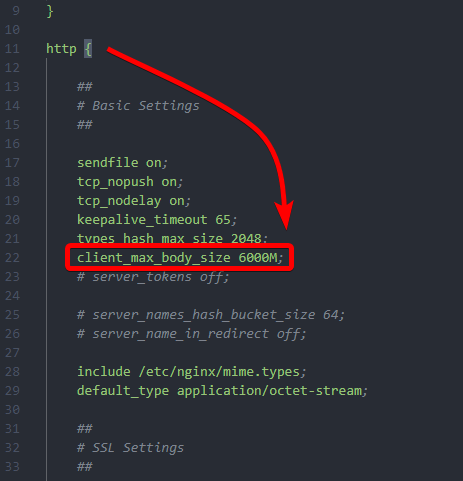
In the HTTP block (after http {) is where the below line can be placed. Be sure that the client_max_body_size is not already present in the configuration file.
client_max_body_size 1000M; # This will increase the limit to 1GB. Measured in MB.Setting the value to 0 will disable the limit. This is not recommended but is possible.
Testing & Applying the Change
Before restarting Nginx the configuration changes should be checked using the below test command to ensure there's not syntax errors.
nginx -tThe expected result should appear like:
nginx: the configuration file /etc/nginx/nginx.conf syntax is ok
nginx: configuration file /etc/nginx/nginx.conf test is successful
If the configuration syntax and test is ok, restart Nginx to apply the changes.
service nginx restart